Frequently asked questions about Microsoft 365
For issues related to Trustpunt, please first seek assistance from the Trustpunt administrator: Stephanie Bouckenhove.
If the administrator cannot provide help or is unavailable, create a support ticket. When creating the ticket, refrain from attaching screenshots with sensitive information. If necessary, make any sensitive information in the screenshots unreadable or instead, provide a direct link to the relevant form within the ticket.
Then you need to add the location where these files are stored as a trusted location. Go to File > Options > Trust Center > Trust Center Settings... > Trusted Locations > Add New Location... > Browse... Browse to the location you want to add as a trusted location and check “Subfolders of this location are also trusted” before confirming with OK.
- Go to https://myaccount.microsoft.com
- Log in with your UGent account.
- Select "Sign out everywhere".
- Go to “Access to work or school”.
- Disconnect from UGent.
- Log back in to the M365 application.
If the prospect has an active welcome-account, then open a ticket for e-stufi support (M365).
If the prospect doesn't have a welcome-account or the welcome-account is inactive, then it is better to directly contact the Oasis helpdesk helpdesk.oasis@UGent.be
In both cases, please provide all relevant information: prospectnr, e-mail they are trying to login with, error message(s) and/or description of the problem.
If you are working on a Ghent University device, you can select Ghent University templates via the locally installed version of PowerPoint on this device. Start PowerPoint on your device > New > the Ghent University tab.
If you do not see this UGent tab, it is likely that your device is not managed by UGent or that it has not been installed with the standard UGent configuration via Intune or ECM.
Employees find information on:
- Microsoft 365 (UGent intranet)
- Microsoft 365 Kennisplatform (NL only)
Students find information on:
- Microsoft 365 (UGent student portal)
- Microsoft 365 Kennisplatform (NL only)
An overview of solutions can be found at:
- Data storage (ICT Helpdesk website)
- Data storage (UGent intranet)
- Delen vanuit M365 toepassingen (Microsoft 365 Kennisplatform)
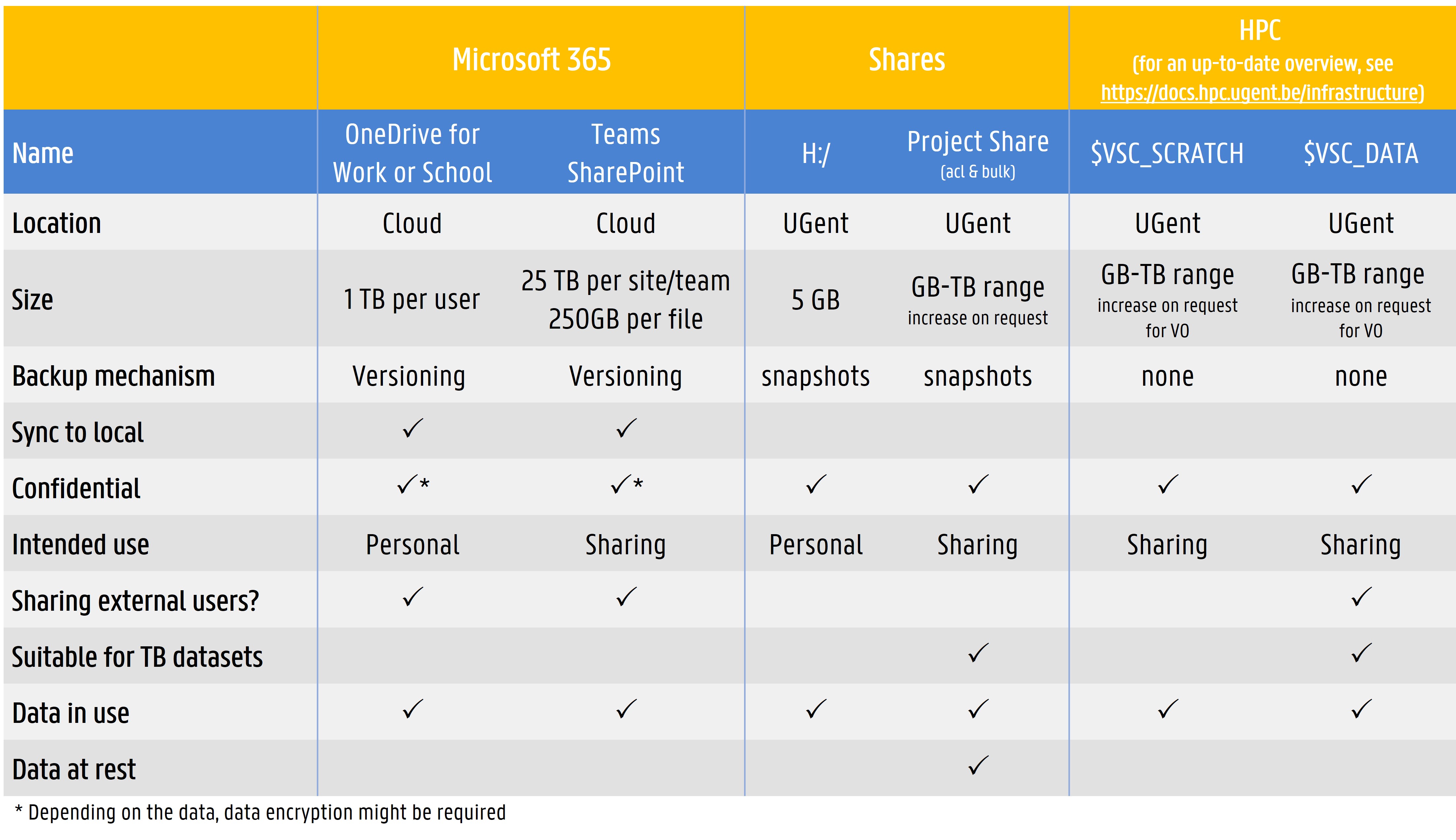
Source: Storing and backing up data
Free versions
1. Copilot in Windows, on the web and in the mobile app without being logged in to the app.
2. Copilot M365 as a secure business version where you are logged in with your Ghent University account (select “Work or school account”):
- Access via m365.cloud.microsoft/chat
- No integration with Word, Excel, PowerPoint, or Outlook
- Basic AI chat for questions, writing, and brainstorming
- Limited performance during peak hours
Paid version
Staff can purchase a license for the paid version via the Microsoft Select Plus agreement.
- Access via m365.cloud.microsoft/chat
- Integration in Outlook, Teams, Word, Excel, PowerPoint
- Faster and more reliable
- Access to business data (emails, documents, meetings) for contextual help
- Enterprise security and compliance